
Dynamics 365 Release Waves Are Ending. How Should Validation Change?
Microsoft's decision to retire the twice-yearly Dynamics 365 release wave model removes a planning checkpoint that many ERP teams used to organize impact reviews, UAT, regression testing, training, and partner work.
Product-specific release and deployment schedules remain in place. Microsoft is changing when and where planned capabilities are communicated.
Beginning in September 2026, new Dynamics 365, Power Platform, and Dataverse capabilities will be published through the Microsoft AI at Work roadmap as plans are committed. Microsoft will no longer publish new release wave plans, and Release Planner will retire on November 15, 2026. Microsoft explained the transition in its August 25 announcement.
Validation teams now need another trigger for work that previously began with a release wave review. A workable model connects each relevant Microsoft change to an impact decision, the affected business processes, the appropriate validation, and a recorded sign-off.
The roadmap becomes the intake layer
The AI at Work roadmap provides several useful ways to monitor change. Teams can create filtered views, subscribe to all or individual roadmap items through RSS, export filtered data to CSV, and share links that retain their filters. Microsoft also provides a Release Communications MCP Server for organizations that want AI tools to query roadmap items, timelines, and product changes.
Roadmap items move through three statuses:
- In Development
- Rolling Out
- Launched
Those tools make roadmap information easier to access and automate. They do not determine whether a feature affects a customized order-to-cash process, a warehouse integration, a financial control, or an ISV solution in your environment.
That assessment remains the customer's responsibility.
Microsoft Message Center also continues to serve a different purpose. The public roadmap shows what Microsoft plans across its products. Message Center provides notices relevant to a tenant. Microsoft Learn remains the source for product documentation and implementation guidance. Product-specific tools and schedules still determine when an update reaches a particular environment.
An effective change process needs to connect all of them.
Replace the wave calendar with a change-to-evidence workflow
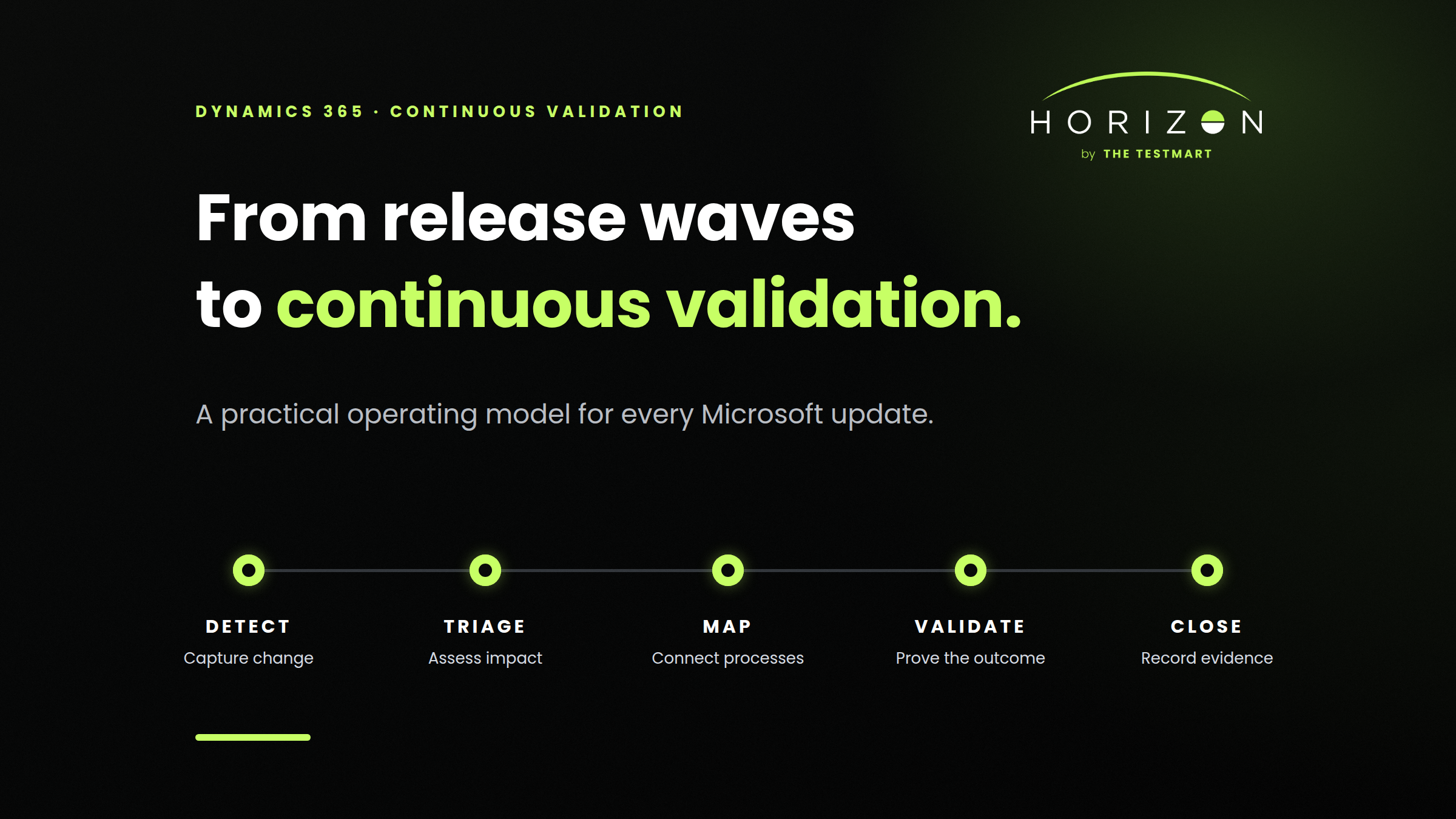
A continuous Dynamics 365 validation process can be organized into five stages:
- Detect: Capture a new roadmap item, tenant notice, service update, or deployment event.
- Triage: Decide whether it is relevant and how much business risk it carries.
- Map: Connect the change to affected processes, applications, integrations, customizations, roles, and controls.
- Validate: Execute the appropriate level of validation in the correct environment.
- Close: Record results, exceptions, approval, and any required follow-up.
Most enterprises can fit these five stages into the change management, application lifecycle management, and validation practices they already have.
1. Build one intake queue
Continuous publishing becomes difficult when each source is monitored by a different person and the findings live in separate spreadsheets, inboxes, or meeting notes.
Create one intake queue for potentially relevant Microsoft changes. It can live in Azure DevOps, Jira, ServiceNow, Microsoft Planner, or another system your teams already use.
Each item should contain, at minimum:
- Microsoft feature, roadmap, or message ID
- Source link
- Affected Microsoft product
- Current status and expected timing
- Tenant or environment relevance
- Internal owner
- Initial risk classification
- Affected business processes
- Required action and due date
Assign one role to own intake quality and routing. That person does not need to understand every business process. The job is to make sure potentially relevant changes are captured, assigned, and not left unassessed.
Keep a monthly or quarterly roadmap meeting if it helps teams coordinate decisions. Use RSS, Message Center notifications, or an automated feed to create awareness as changes appear, rather than waiting for that meeting to discover them.
2. Triage based on business impact
Not every roadmap item requires regression testing. Some items will be irrelevant to your products or regions. Some are optional features your organization does not plan to enable. Others may affect a critical workflow even though the feature description appears narrow.
A useful impact assessment answers six questions:
- Is the affected product, capability, or region part of our environment?
- Is the change optional, enabled by default, or scheduled for future enforcement?
- Which user roles and business processes could be affected?
- Does the process include customizations, Power Platform components, ISVs, APIs, or third-party integrations?
- Could the change affect financial reporting, security, data integrity, or a controlled process?
- When will the relevant version or capability reach UAT and production?
The result should be a simple risk classification that your organization can apply consistently:
- Low impact: Record the decision and monitor. No execution may be required.
- Medium impact: Run targeted validation against the affected workflow, role, configuration, or integration.
- High impact: Validate the complete end-to-end process, including dependencies, exception paths, data, integrations, and control points.
Keep the classification simple and document why the team chose each level of validation.
3. Map changes to complete business processes
A Dynamics 365 feature rarely operates in isolation from the rest of the business.
Consider a change that affects sales order entry. Its impact might extend to pricing, credit checks, tax calculation, inventory availability, Power Automate approvals, warehouse release, an ISV shipping solution, customer communications, and the financial posting that follows.
A UI test that confirms the sales order form still opens would cover only a small part of that risk.
For each high-value process, maintain a basic business process record containing:
- Process name and business owner
- Criticality
- Dynamics 365 applications involved
- Connected systems and ISVs
- Important data and business rules
- Roles and security dependencies
- Standard path and material exception paths
- Existing manual and automated validation coverage
- Evidence and approval requirements
This business process catalog becomes the bridge between Microsoft's feature-level communication and the way your organization actually operates.
It also makes impact assessment faster. Instead of asking the whole organization whether a new roadmap item matters, the release owner can identify the processes connected to that product area and route the question to the right owners.
4. Trigger validation from the environment schedule
A roadmap status does not confirm that a capability is active in your tenant or that a service update has reached your UAT environment.
Use roadmap information to prepare. Use the actual environment and deployment schedule to trigger execution.
For Finance and Operations apps, Microsoft currently delivers service updates in February, April, July, and October. Customers must take at least two and can take up to four updates per year, with the ability to pause one consecutive update. Microsoft's service update guidance recommends applying the release to a nonproduction environment, performing impact analysis and regression testing, resolving issues, and then deploying to production.
Customer engagement apps and Power Platform follow their own staged deployment practices. Major updates arrive in April and October, while minor service updates can deploy weekly by region. Business Central also retains its product-specific update cycle.
Your internal triggers might look like this:
- In Development: Monitor and identify possible process owners.
- Rolling Out: Confirm tenant applicability, expected timing, and validation scope.
- Update available in UAT: Execute the approved validation scope.
- Production deployment scheduled: Review results, exceptions, and sign-off.
- Deployment complete: Confirm production status and close the record.
This keeps roadmap monitoring and release validation connected without treating them as the same activity.
5. Match validation depth to risk
Use the item's business risk to determine the validation scope rather than running the full regression suite by default.
For a low-impact item, the team may only need to record that the affected capability is not used or is not enabled. A medium-impact change may require focused validation of a specific role, form, report, API, or workflow. A high-impact change should trigger end-to-end validation of the business process and its dependencies.
For critical processes, coverage should consider more than the standard path. Include the business rules and exceptions that create material operational or financial risk, such as:
- Approval thresholds
- Credit holds
- Pricing and discount rules
- Tax behavior
- Inventory shortages
- Failed integrations
- Security restrictions
- Posting exceptions
- Reversals and corrections
Where appropriate, validate the UI, APIs, data, integrations, and downstream outcomes together. The goal is to prove that the process still produces the intended business result.
6. Make evidence part of execution
Validation evidence is much easier to trust when it is captured at the time the work occurs.
Each completed change record should show:
- The Microsoft update, feature, or message that triggered the assessment
- The environment and version validated
- The business processes included in scope
- The test assets and data used
- Execution time and results
- Defects, exceptions, and retest outcomes
- The person who reviewed the results
- Final approval and production decision
This traceability is especially important for organizations that need to demonstrate how system changes were assessed and approved. Reconstructing the story later from screenshots, emails, and meeting notes adds work and creates avoidable gaps.
Keep the evidence package complete, consistent, and tied to the actual update. Additional detail is useful only when it helps someone understand the decision or reproduce the result.
7. Treat test maintenance as part of release capacity
The operating model above only works if the validation assets are ready when the update reaches UAT.
Many teams automate test execution but still perform test maintenance manually. A changed form, field, locator, security role, or integration can create a backlog of broken tests at the beginning of the validation window. The team then spends its time repairing existing coverage instead of evaluating the release.
Track that maintenance effort directly:
- How many tests require manual repair after an update?
- How long does it take to restore reliable coverage?
- How many engineering hours go to maintenance instead of new coverage?
- Which critical processes remain manual because automation is too expensive to maintain?
- Can the suite validate APIs, integrations, and data as well as UI actions?
At TheTestMart, this constraint shaped our work on Horizon. Horizon uses Dynamics 365 environment intelligence and a five-layer self-healing approach to adapt validations as forms, fields, and metadata change. Adjustments are logged for review, so maintenance does not become an invisible change to the expected outcome.
Whatever tooling you use, evaluate maintenance as part of release readiness. Coverage that cannot be made reliable within the available validation window should not be treated as available coverage.
8. Measure response time, coverage, and maintenance
Counting annual test cycles made sense when teams organized validation around two release waves. A continuous model needs operational measures that show how quickly and reliably the organization responds to change.
Start with five:
- Time to assess: Time from receiving a relevant notice to recording an impact decision.
- Unassessed change backlog: Relevant items that still lack an owner or completed assessment.
- Validation lead time: Time from the update reaching UAT to completed evidence and sign-off.
- Critical-process coverage: Percentage of critical business processes with repeatable validation at the appropriate layers.
- Maintenance effort: Hours spent repairing or updating test assets for each release.
These measures show where the process is slowing down. A growing intake backlog indicates an ownership problem. A long validation lead time may point to environment scheduling, data preparation, manual execution, or maintenance. High automation coverage paired with high repair effort indicates that the suite is larger than the team's practical ability to sustain it.
A transition plan before Release Planner retires
Release Planner retires on November 15, 2026. Teams can use the transition period to establish the new workflow without attempting to redesign the entire validation program at once.
Before September 15
- Inventory saved Release Planner views, bookmarks, reports, and internal documentation.
- Identify meetings and workflows that currently depend on release wave publication.
- Assign an owner for roadmap and Message Center intake.
- List the Dynamics 365 products, Power Platform components, regions, and environments that require monitoring.
From mid-September through mid-October
- Configure AI at Work roadmap filters and RSS subscriptions.
- Create the intake queue and required fields.
- Define low-, medium-, and high-impact validation rules.
- Select one business-critical process for the pilot.
- Connect the process to its current manual and automated coverage.
From mid-October through November 15
- Run one real Microsoft change through the complete workflow.
- Measure assessment time, validation lead time, and maintenance effort.
- Correct missing ownership, data, evidence, or handoffs.
- Update internal documentation and retire links to Release Planner.
- Confirm that business owners, IT, QA, partners, and compliance stakeholders know where decisions and evidence will live.
The pilot should be small enough to complete but important enough to expose real dependencies. One end-to-end process is usually a better test of the model than a broad inventory of unrelated test cases.
Set practical boundaries for continuous validation
Continuous validation is a responsive process, not an instruction to run every test every day. Teams can continue using:
- Risk-based selection instead of validating every public roadmap item
- Monthly or quarterly meetings for coordination and decisions
- Business-user UAT where judgment is important
- Existing tools that provide reliable, maintainable coverage
- Manual controls where automation would add cost without reducing meaningful risk
Relevant changes should enter a defined process when they appear, and validation should occur when the applicable change reaches the environment. The frequency and depth should reflect the actual risk. Fix ownership and process gaps before assuming a new platform will solve them.
Where to start
By November 15, every Dynamics 365 team should be able to answer five questions:
- Who monitors the new roadmap and tenant notices?
- Where are relevant changes recorded and assigned?
- How are changes connected to business processes and risk?
- What triggers validation in UAT?
- Where do results, exceptions, and approval live?
Choose one critical process and one upcoming update. Trace them through detection, triage, process mapping, validation, and sign-off. The missing handoffs will become visible quickly, and the team can fix them before applying the model more broadly.
To see how Horizon supports maintained validation across Dynamics 365 user workflows, APIs, integrations, data, and end-to-end business processes, explore the Horizon platform. If you want to evaluate the approach against a real process in your environment, schedule a working session with TheTestMart.
Related reading: For a concise breakdown of what Microsoft announced, what remains unchanged, and what ERP teams should do before Release Planner retires, read Microsoft Is Retiring Dynamics 365 Release Waves: What ERP Teams Should Do Next.


See it in your environment, today.
Real test scenarios. Real results. No sandbox demo.